KueIt Features
The go-to audio sampler soundboard app for DJs and live performers

Uniquely designed audio sampler app for your sound effects, audio drops & jingles
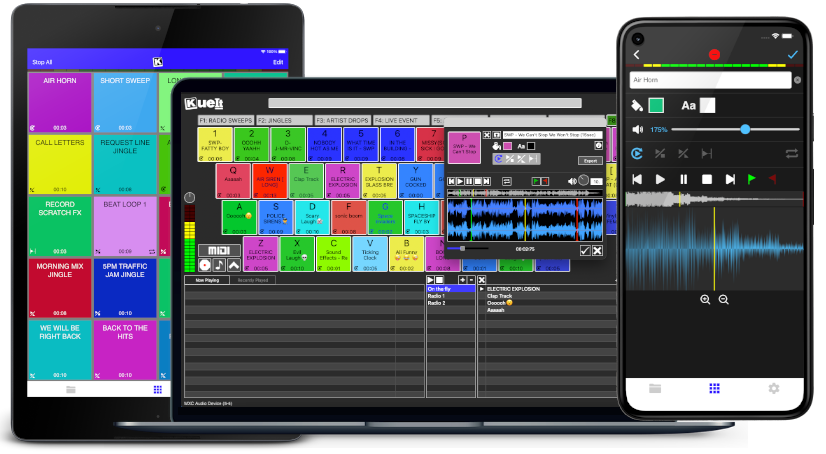
The DJ soundboard app is available for macOS, Windows, the App Store & Google Play
30 day money back guarantee for desktop and 7 day FREE trial for mobile devices!!!
KueIt DJ sound effects app can be used in many settings
Replace large bulky machines with this cost-effective DJ soundboard app
KueIt audio sampler app allows you to play all your drops, jingles, and sound effects
Performers, arm yourself with an arsenal of audio files at your fingertips with a handy DJ soundboard app
Instantly trigger the appropriate sound for the big play straight from your computer or mobile device
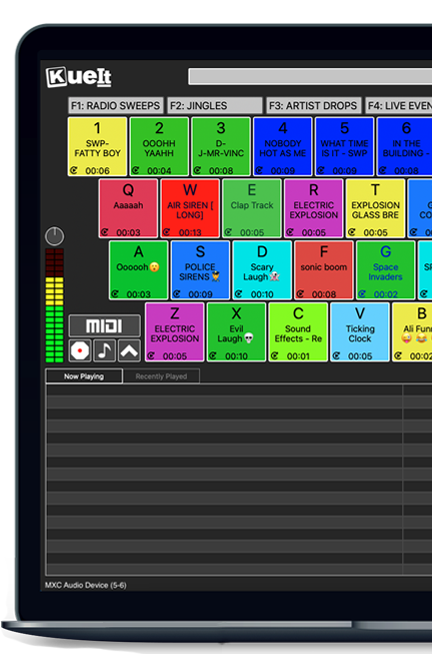
KueIt gives you the flexibility you need. Load your audio tracks to your profile and customize your layout. Trigger your drops, jingles, sound effects and songs instantly by the touch of your fingertips.
Enjoy your very own audio sampler app packed with amazing features
Our cloud covers different sound types including sound fx, voice tracks, beat loops, percussion & more!
* Cloud access is only offered for KueIt Mobile Pro Plan
users
* Pro Plan available via in-app purchase
KueIt was designed for the serious DJ, podcaster, producer, or broadcaster. The easy yet reliable performance of the KueIt soundboard app makes it perfect for podcasts, nightclubs, TV, live concerts, sporting events, school gymnasiums, and anywhere that quality music, jingles, or sound effects are needed. Don't compromise the outcome of your event or broadcast. Go with a DJ sampler app system that works... KueIt.
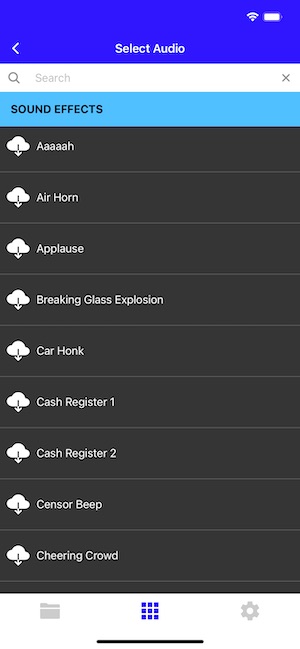
Easily add audio clips to your profile and play them with zero delay
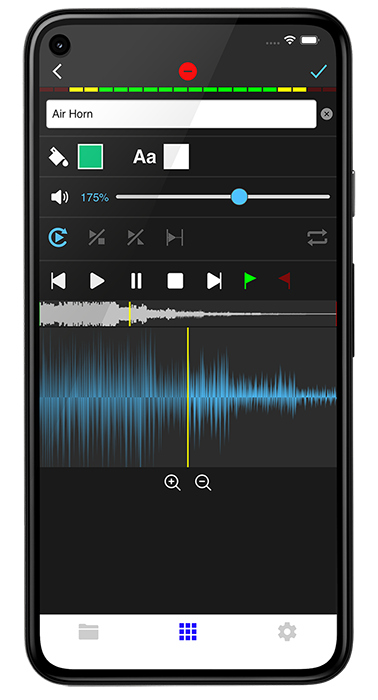
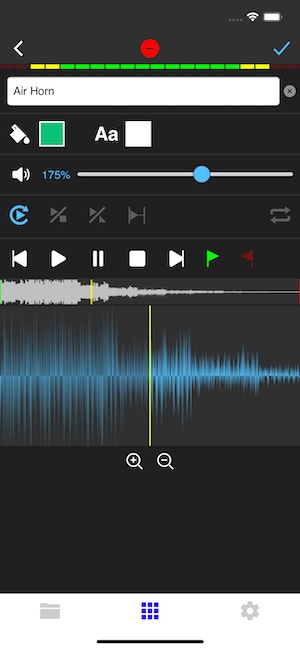
Edit name & volume. Set play mode, set up loops & start/end points via waveform
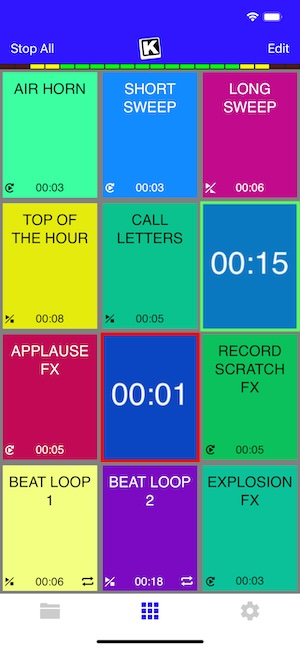
Instantly play your loaded audio clips at the touch of your fingertips
Get studio quality audio. KueIt also works with external soundcards
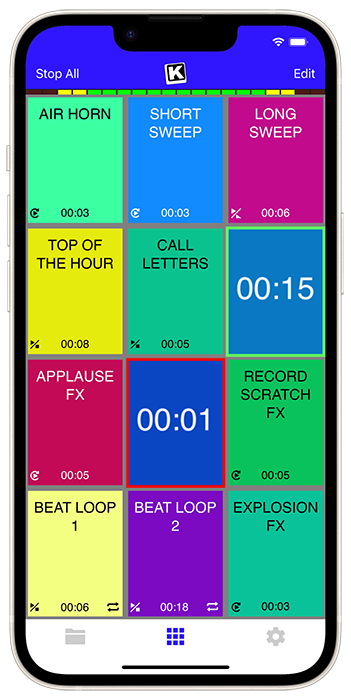
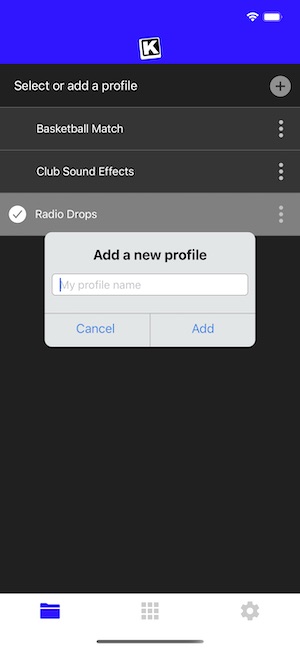
Create custom profiles in the audio sampler app and assign multiple audio clips for each profile
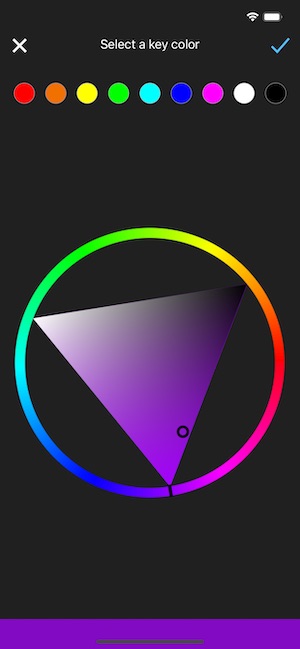
Set the pad color & font color of each pad
Use KueIt on macOS/Windows or iOS/Android phone or tablet
Backup your KueIt profiles via iCloud/Google Drive on mobile or via export on desktop

"KueIt allows DJs to step their game up. You can play like a radio DJ in front of a crowd, KueIt is one of the hottest programs to hit the market"

"KueIt made it easier for me to load up my sounds. No more instant replay"

"KueIt makes my life (DJing on the radio) easier, and it's extremely user friendly. After using it for only a few minutes, I felt comfortable enough to take it to the radio and get busy with it live on the air"
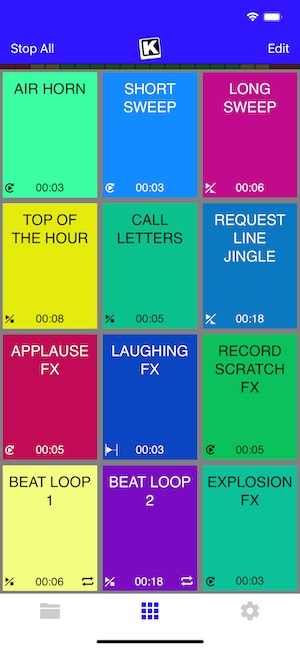
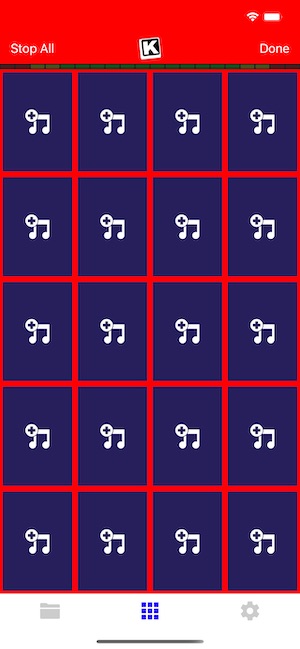
KueIt is designed to easily load, edit and customize your profiles. Once loaded, your pads are ready to be triggered instantly
In the dim glow of a triple-monitor setup, Elliot Voss nursed his third coffee of the morning. A freelance security auditor with a reputation for finding what others missed, he lived by one rule: never trust the host.
He reached for his phone. The DA’s office picked up on the first ring. mac os vmware image
That said, the technical community remains split. Many developers argue that “fair use” or “testing purposes” justifies it, but legally, Apple has the right to shut down distribution of these images. Proceed with caution, and never use a macOS VM for commercial purposes on non-Apple hardware.
Unlike a standard ISO installer, which requires you to click through setup screens for 30 minutes, a pre-built image allows you to "unzip and play." Within minutes, you can have a fully functional macOS desktop running inside a resizable window on your current machine. In the dim glow of a triple-monitor setup,
To run macOS on a PC using VMware , you generally need a macOS disk image (typically in or .VMDK format) and a specialized "unlocker" tool to enable macOS support in the VMware interface. Essential Requirements
He dragged the image into the VM library. Fusion hesitated, then spun up a configuration wizard, detecting the guest OS as "macOS 12.x (unsupported)." Elliot overrode the warnings, stripped away the sound card, disabled the shared clipboard, and pointed the network adapter to a custom isolated LAN—no physical uplink, no accidental phone-home. The DA’s office picked up on the first ring
His latest project was a nightmare. A former client, now under federal investigation, had handed him a corrupted MacBook Pro, its internal drive a wasteland of fragmented logs and deleted timestamps. But Elliot suspected the real evidence wasn't on the laptop itself—it was in the way the laptop had been used. The trail, he believed, led through a phantom operating system: a macOS VM that had once run inside this very machine.
Inside: a single SQLite database. Elliot queried it. Transaction logs. IP addresses. Encrypted notes. The entire history of a covert data leak that had been running for eleven months, using compromised VMware images as untraceable carriers.
Running apps in a sandbox environment without risking a primary machine.
In the dim glow of a triple-monitor setup, Elliot Voss nursed his third coffee of the morning. A freelance security auditor with a reputation for finding what others missed, he lived by one rule: never trust the host.
He reached for his phone. The DA’s office picked up on the first ring.
That said, the technical community remains split. Many developers argue that “fair use” or “testing purposes” justifies it, but legally, Apple has the right to shut down distribution of these images. Proceed with caution, and never use a macOS VM for commercial purposes on non-Apple hardware.
Unlike a standard ISO installer, which requires you to click through setup screens for 30 minutes, a pre-built image allows you to "unzip and play." Within minutes, you can have a fully functional macOS desktop running inside a resizable window on your current machine.
To run macOS on a PC using VMware , you generally need a macOS disk image (typically in or .VMDK format) and a specialized "unlocker" tool to enable macOS support in the VMware interface. Essential Requirements
He dragged the image into the VM library. Fusion hesitated, then spun up a configuration wizard, detecting the guest OS as "macOS 12.x (unsupported)." Elliot overrode the warnings, stripped away the sound card, disabled the shared clipboard, and pointed the network adapter to a custom isolated LAN—no physical uplink, no accidental phone-home.
His latest project was a nightmare. A former client, now under federal investigation, had handed him a corrupted MacBook Pro, its internal drive a wasteland of fragmented logs and deleted timestamps. But Elliot suspected the real evidence wasn't on the laptop itself—it was in the way the laptop had been used. The trail, he believed, led through a phantom operating system: a macOS VM that had once run inside this very machine.
Inside: a single SQLite database. Elliot queried it. Transaction logs. IP addresses. Encrypted notes. The entire history of a covert data leak that had been running for eleven months, using compromised VMware images as untraceable carriers.
Running apps in a sandbox environment without risking a primary machine.